
If you write an educational blog, teach an online course, or share vocabulary articles, you usually have to write phonetic spellings or link out to external websites. SayItVid Widgets let you embed an interactive, multi-clip pronunciation player directly onto your own web page. Your visitors can watch real speakers, read subtitles, and repeat tricky sentences without ever leaving your site.
What is a SayItVid Widget?
A SayItVid Widget is a lightweight video player that fits neatly into any website or blog post.
It packages any public playlist you create in /saved into a clean, interactive box. Your visitors can play video clips, see highlighted subtitles, check regional accents, and cycle through every clip in your list directly on your page.
The widget is fully responsive, meaning it automatically looks great whether your visitors are reading on a smartphone or a widescreen monitor.
How to Get Your Embed Code in 2 Clicks
Getting your embed code is simple:
- 1Open any playlist you created in /saved and make sure its visibility is set to Public.
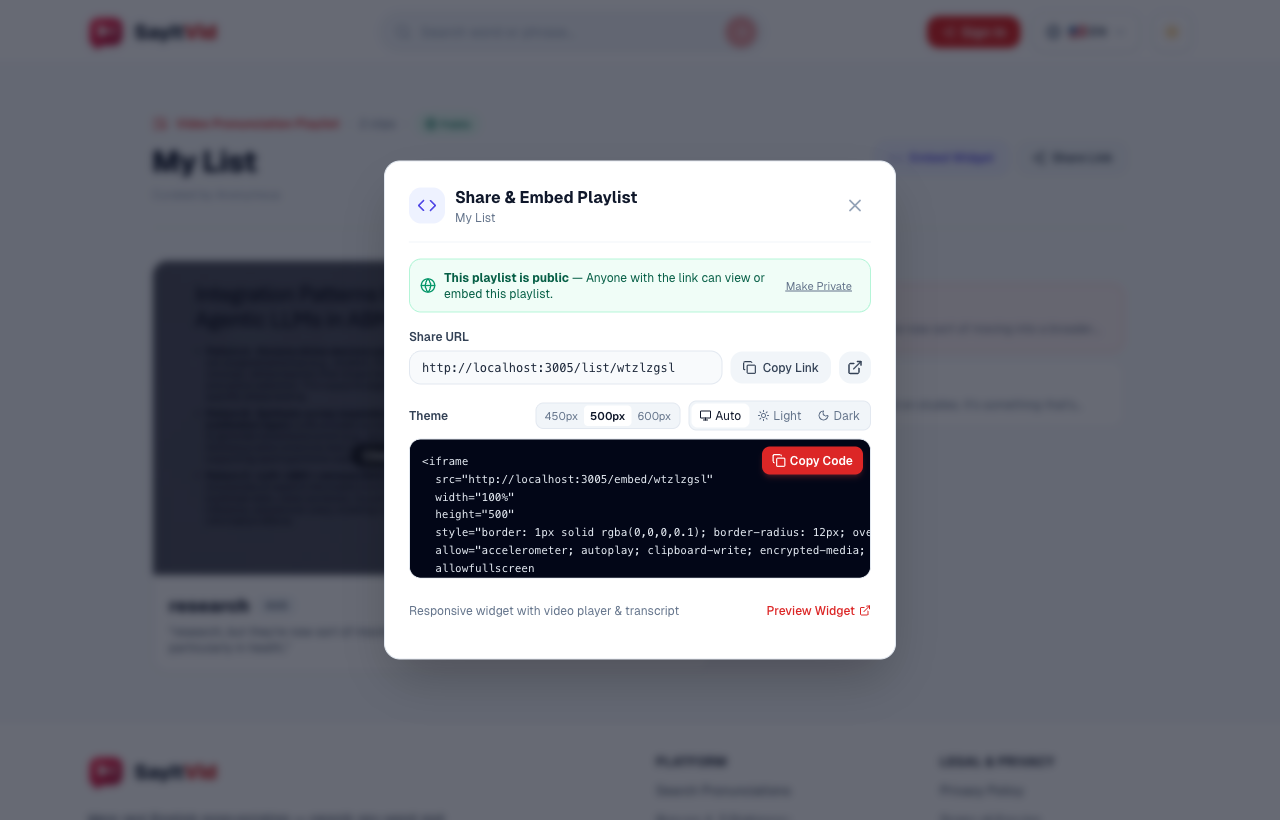
- 2Click the Embed Widget button (with the code brackets icon) near the top of the page.
- 3A window opens showing your embed code. Click the red Copy Code button.
The snippet is now copied to your clipboard, ready to paste into your website!
Customizing the Look (Light, Dark & Size)
Inside the popup, you can personalize how the widget looks so it blends right into your site:
- Choose a Theme: Select Auto (syncs with visitor light/dark preferences), Light (clean white background), or Dark (sleek dark aesthetic).
- Pick a Height: Choose between 450px, 500px, or 600px to fit your layout.
- Responsive Width: The embed code automatically uses 100% width so it neatly fills your article column on both mobile and desktop screens.
What Your Visitors See and Can Do
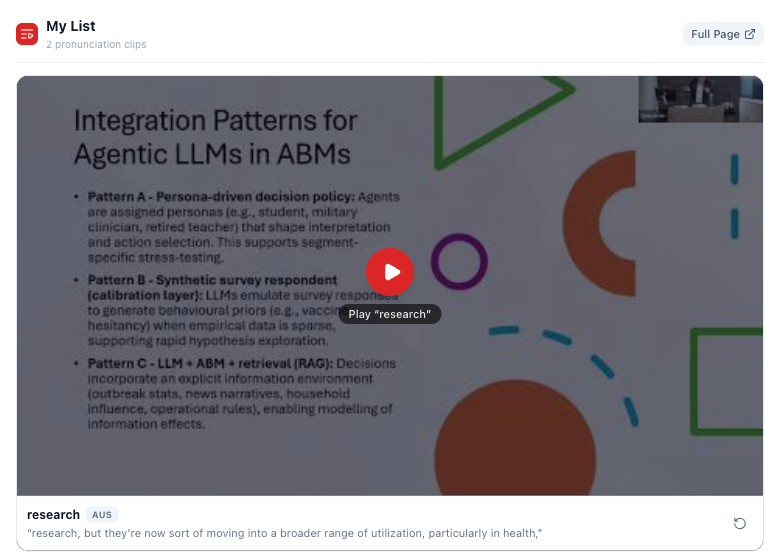
When visitors see the widget on your page, they get a complete, fun study experience:
- Instant Play: Click Play to start watching and listening immediately.
- Read Subtitles: The exact sentence is displayed right beneath the video.
- Replay Button: A quick tap on the loop arrow repeats the sentence as many times as they want.
- Next & Previous Clips: Visitors can easily click through all the clips in your playlist.
- Fast Loading: The video only loads when the visitor scrolls down to it, keeping your web pages fast and snappy.
Placing an interactive pronunciation widget right after a vocabulary explanation dramatically boosts how long visitors stay on your page.
How to Add it to WordPress, Notion & Online Courses
Adding the widget to your website takes less than a minute:
- WordPress (Gutenberg): Add a Custom HTML block to your post, paste the snippet, and click Preview.
- WordPress (Elementor): Drag an HTML widget into your layout and paste the code.
- Notion: Type
/embedon a new line, paste the widget link, and hit Enter. You can drag the corners to resize it. - Canvas, Moodle, or Blackboard: When editing an assignment, switch to HTML View and paste the code.
- Any HTML Website: Simply paste the iframe code directly into your page template.
Why Interactive Widgets Make Your Website Better
Interactive widgets give your website several distinct advantages:
- Keeps visitors on your site: Instead of sending readers away to YouTube, they stay on your page to practice.
- Better learning results: Hearing native speakers in real sentences makes vocabulary far more memorable than plain dictionary text.
- Completely free: You can create and embed as many widgets as you like at zero cost.
Key Takeaway
SayItVid Embeddable Widgets bring authentic spoken English video straight to your readers and students. Create a public playlist today and grab your free embed snippet!

SayItVid Team
AuthorPlatform & Product Guides
Official guides, tutorials, and product walkthroughs from the SayItVid platform development and linguistics team.